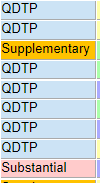

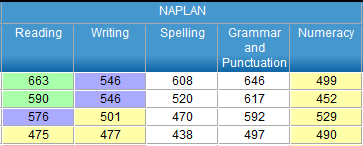
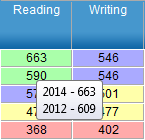
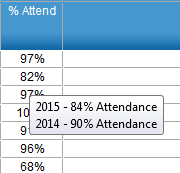
Student results The student results window displays the most recent results available for the selected students for the selected reporting period. • Columns can be sorted by clicking on the column headers • Results that are for a previous period will be displayed in red text The fields displayed are outlined in the table below Student Number The SCSA number for the student Surname The student’s surname First Name The student’s first name Year The student’s academic year for the selected calendar year NCCD Level of Adjustment Level of adjustment reported nationally following the Semester 2 school census. SIS Level of Adjustment Level of adjustment recorded in the SIS Student UDI field. In addition to the levels the hovertext will also show the disability category eg Supplementary (Cognitive) NAPLAN The most recent result for the student in the 5 NAPLAN test areas. Student NAPLAN results that relate to a different test period to other students will be highlighted in red text. NAPLAN scores are colour coded to reflect student achievement and are the same as used in SAIS. • Green - Excellent • Purple - Good • Yellow - Satisfactory • Red - Limited Hovering over a cell will show the year of assessment, the Band and where applicable the colour background colour description. % Attend The percentage attendance for the student for the selected year. Hovering over a cell will display historical % Attendance values. Learning Areas The number of SEN learning areas assigned to the student in SEN Planning Objectives - Total Number The total number of objectives assigned to the student in SEN Planning Objectives - Resulted The number of objectives assigned to the student in SEN Planning with assessments made against them Objectives - Achieved The number of objectives that have been achieved. Schools are able to create and use their own scales and different values may be used to indicate the achievement of an objective. (e.g. Achieved, Consistently, Always) The default system scale, The RTP SEN Scale: Achieved, Substantially achieved, Partially achieved, Not achieved is recommended and will ensure greatest integration and transferability of data. To count as achieved, a scale item must either be the word Achieved or have a scale value of 1. Objectives - % Achieved The percentage of objectives that have been achieved Goals - Total Number The total number of goals assigned to the student in SEN Planning Goals - Achieved The number of goals assigned to the student in SEN Planning marked as achieved Goals - % Achieved The percentage of goals that have been achieved Notes A Student can be selected, and a note can be added or edited Date of Last Change Shows the date of the last plan update Individual Disability Allocation (Principal Only) An indication if the student attracts funding under the Individual Disability Allocation • Principal and IDA roles – IDA allocation level Hover over the IDA allocation level for information about eligibility, review and end dates • Other roles – Tick indicating an IDA allocation level
