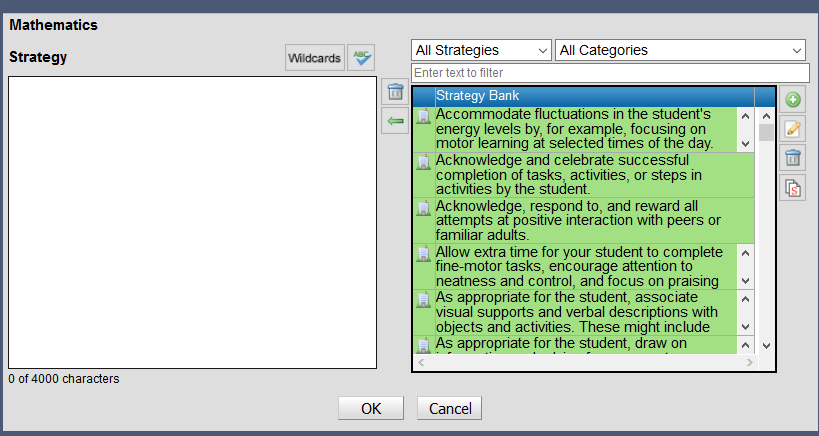
Learning area strategies Learning area strategies describe the approach that will be used to improve student achievement for the learning area. Strategies will appear in the printed plan for a student. To add a learning area strategy: • Select the required group plan • Select the learning area • bon the Edit learning area strategies icon The strategies window will open The left-hand pane will contain the strategy text added to the group plan The right-hand pane a list of strategies associated with the learning area in the strategy bank. Strategies can be entered directly to the strategy field for the selected group plan or added to the strategy bank. Strategies that are added to the strategy bank will be available when adding strategies to other students or in future reporting periods. There are three types of strategy banks System strategies will be available at all schools School strategies will be available to all teachers at a school Teacher strategies will be available to the teacher Strategies added by a teacher will be added to the teacher and school banks. Teachers will be able to edit and delete strategies in their teacher bank and strategies that they have added to the school bank. SEN Administrators can edit and delete strategies in the school bank. Teacher strategies will be identified with an icon the left of the strategy and have a white background School strategies will be identified with an icon and have a light green background System strategies will be identified with an icon and have a dark green background Filters will enable the strategy bank to be filtered by: • Bank type (system, school or teacher) • Category • Keyword search using the search bar
 icon
icon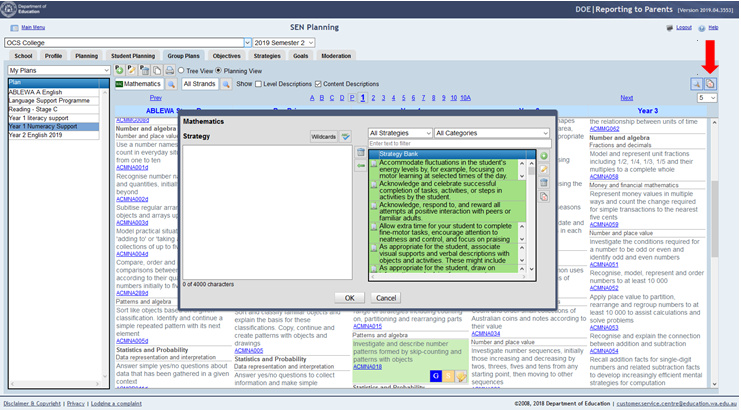
 System strategies will be available at all schools
 School strategies will be available to all teachers at a school
 Teacher strategies will be available to the teacher