The Add New Assessment Outline option allows an assessment outline to be manually created. In most cases assessment outlines will be created using the automated tools described in the Linking Toolbar section.
Note: VET type assessment outlines can be created, linked and maintained automatically based on the competencies assigned to students in groups associated with the assessment outline. This feature can be enabled from the Assessment and Reporting Management – School Preferences – Options window
|
1.
|
 icon.
icon.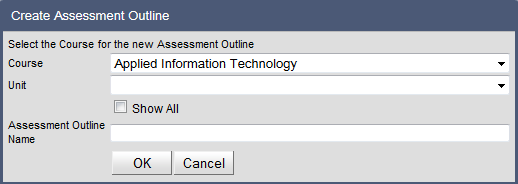
|
2.
|
Select the Course that the assessment outline will relate to by clicking on the drop-down menu.
|
The drop-down menu will be restricted to the courses that are being offered in the reporting period.
To see all courses, tick the Show All checkbox.
|
3.
|
Select the Unit that the assessment outline will relate to by clicking on the drop-down menu.
|
|
4.
|
Enter the Name for the assessment outline.
|
|
5.
|
|
|
|
|
|
|