Task Analysis

Task Analysis
The WACE Tracker and the P-10 Analysis windows allow the monitoring of student progress using semester course or learning area achievements.
There are advantages in being able to identify variations in student performance prior to semester course achievements being entered. This allows earlier identification of issues and early intervention to occur.
The Task Analysis window monitors student progressive performance in assessment outline tasks.
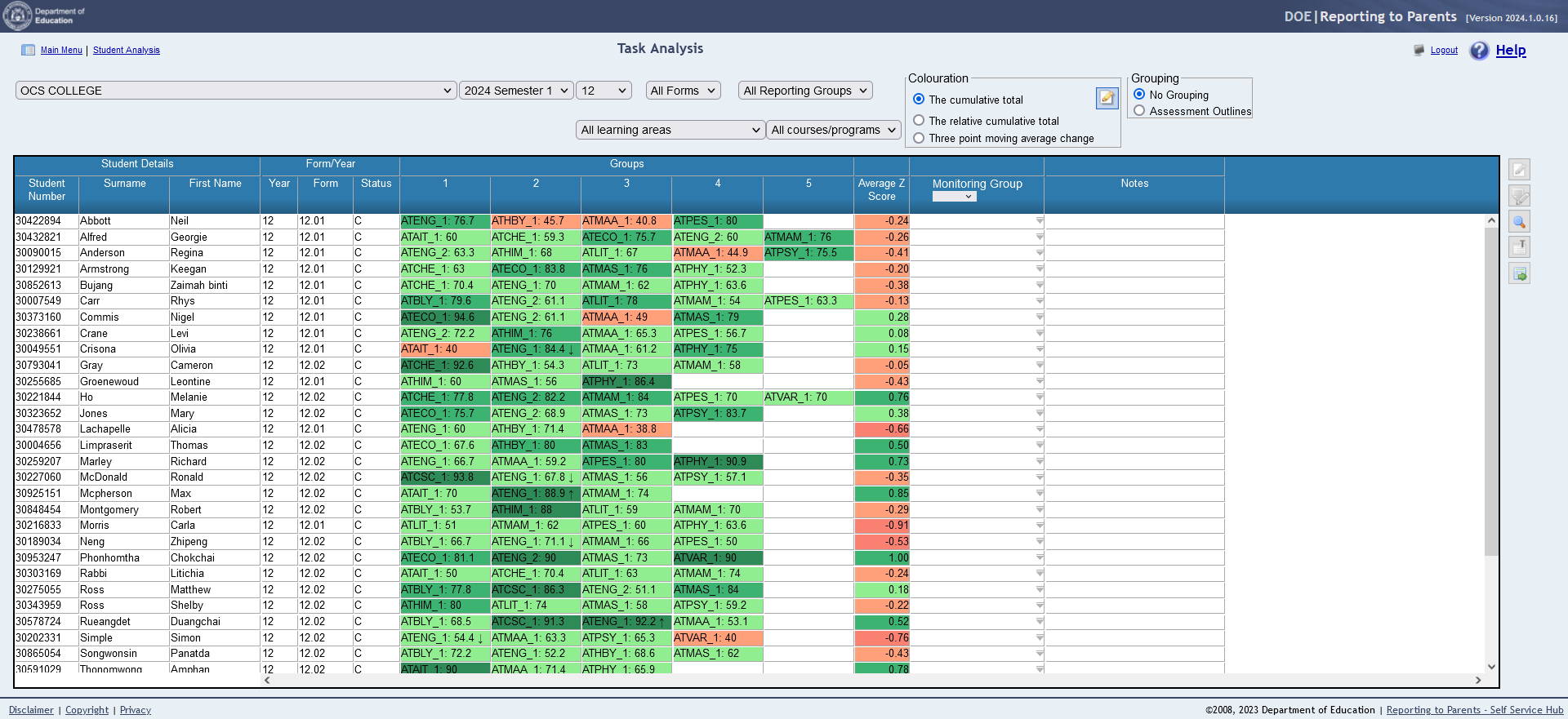
The task analysis window displays the group code and score for each group that is assigned to an assessment outline and has task results entered.
The weighted total for the course is calculated at the time of data entry screen from the completed tasks and task weights from the assessment outline.
The cells will have a background colour determined by the student’s position within the assessment.
The task analysis display can be based on the cumulative total, relative cumulative total and changes to the relative cumulative total.
Background colour ranges for the cumulative total option can be defined by the school.
Colour ranges for the relative cumulative total and changes to the relative cumulative total are system managed and calculated using Z – scores.
To allow comparability between different assessment outlines, the weighted totals are converted to Z-scores and the Z-score is used to determine the background colour.
 
The colour highlights used are:
Dark green – Greater than or equal to 1 standard deviation above the mean.
Mid green – Greater than or equal to 0.5 and less than 1 one standard deviation above the mean.
Light green – Greater than 0 standard deviations below the mean and less than 0.5 standard deviations above the mean
Salmon – Between 0 and -0.5 standard deviations from the mean
Pink – Less than 1 standard deviation below the mean and greater than or equal to 0.5 standard deviations below the mean.
Red – More than 1 standard deviation below the mean
To achieve this, additional data is recorded, in the background, following the entry or editing of task achievements. These data points are dated so a progression of achievement within a course unit can be identified. Only one data point will be created on each day, with further changes within a data resulting in the update of that day’s data point.
The data collected is:
The task analysis is appropriate for any K-10 or senior school group student with an assessment outline with the calculation of a weighted total.

http://www.education.wa.edu.au
Phone (08) 9264 5555
customer.service.centre@education.wa.edu.au
