Reporting and assessment : K-10 reporting : My marks book K-10 : Using the marks book : Add marks book items

Add marks book items
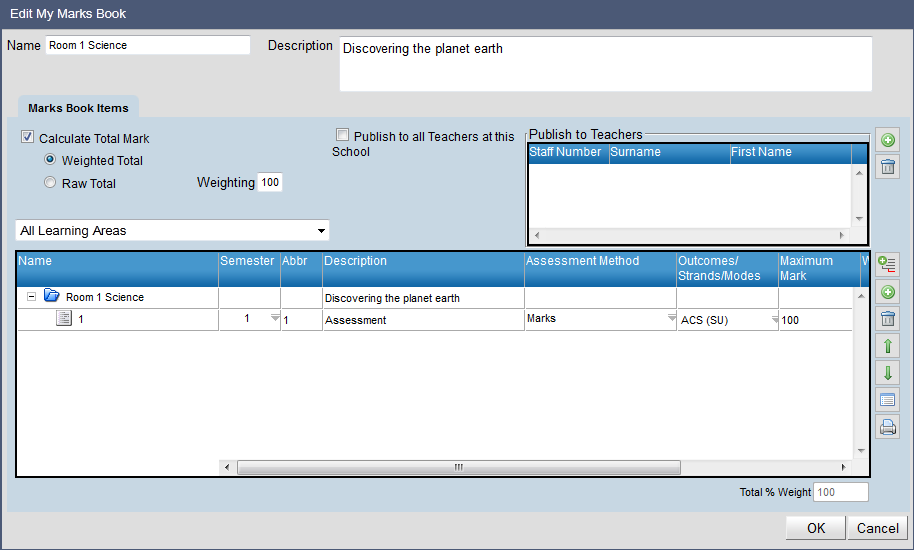
This function allows teachers to add/edit marks book items within their marks book.
The icons in the Edit My Marks Book window are:
Add access to Teacher
This allows a teacher to give other teachers access to the Marks Book item.
Remove access from Teacher
This removes teacher access to the Marks Book item.
Add Folder
This adds a new sub folder to the marks book.
Add Marks Book Item
This adds a new marks book Item to a marks book folder.
Delete Marks Book Item
This removes a marks book Item or an entire marks book folder.
Move Marks Book Item up
This moves a marks book item up.
Move Marks Book Item down
This moves a marks book item down.
Copy Marks Books Items
This allows for teachers to copy marks books published by others onto their own marks book.
Print Marks Book
This will print the marks book schema as a PDF document.

The overall marks book folder can be renamed at the top of the screen.
A description about the marks book can be added at the top of the Marks Book window. To do so:
Click in Name box.
Click out of Name box and new name will populate the folder.
 

http://www.education.wa.edu.au
Phone (08) 9264 5555
customer.service.centre@education.wa.edu.au
