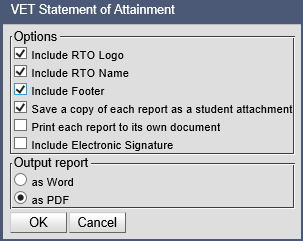
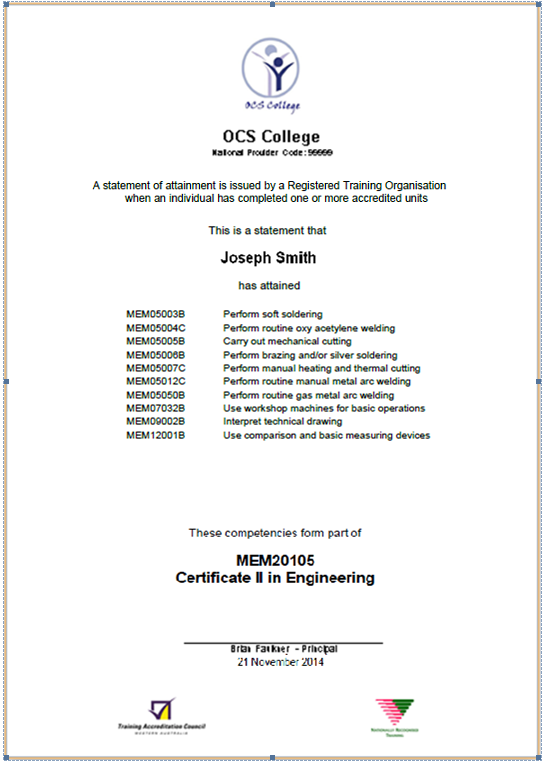
Print Statement of Attainment – For RTO Schools Only The Print Statement of Attainment function will only appear for RTO schools and is only active for qualifications delivered by the school as the RTO. Only qualifications that have not been achieved can be printed. To print the Statement of Attainment: 1. Select the student qualifications that have not been issued. 2. Click on the Print Statement of Attainment icon. 3. Select the required options. Option choices will be determined by the choice of printing on pre-printed stationary or printing a full Statement of Attainment with all required components. When the ‘Include RTO Logo’ or ‘Include RTO Name’ options are de-selected, the RTO logo and name will not be included so that pre-printed stationary can be used. When the ‘include footer’ option is selected, this will print the required TAC and NRT logos. The “Save a copy of each report as a student attachment” option defaults to selected. A copy of the printed statement of attainment will be placed in the student document store. If the “Print each report to its own document” is selected a zip folder of individual reports will be returned rather that a single file containing all reports. If the ‘Include electronic signature’ option is selected, this will use the electronic signature uploaded and stored in RTOs > Edit RTO Details > Add RTO signature. 4. Click on OK. A sample report is shown below: