Table of Contents Back Previous Next Logo

Managing Users > Editing a User
Editing a User
To edit a user's details:
On the SAIS Main Menu, select Edit Users.
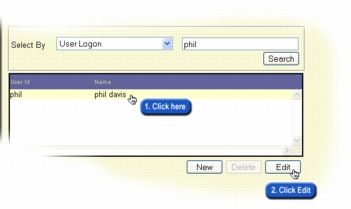
The Find User screen is displayed.
Use the search functionality on this screen to find the user's record.
The user's details are displayed in the Edit User screen. You can now make changes to the user's details, roles and school assignments. Refer to Adding a New User for detailed information about the use of the three tabs on this screen.
Click Save for each tab on which you make changes.

Table of Contents Back Previous Next
http://www.eddept.wa.edu.au
Tel: (08) 9264 4111
(08) 9264 5005
websupport@det.wa.edu.au