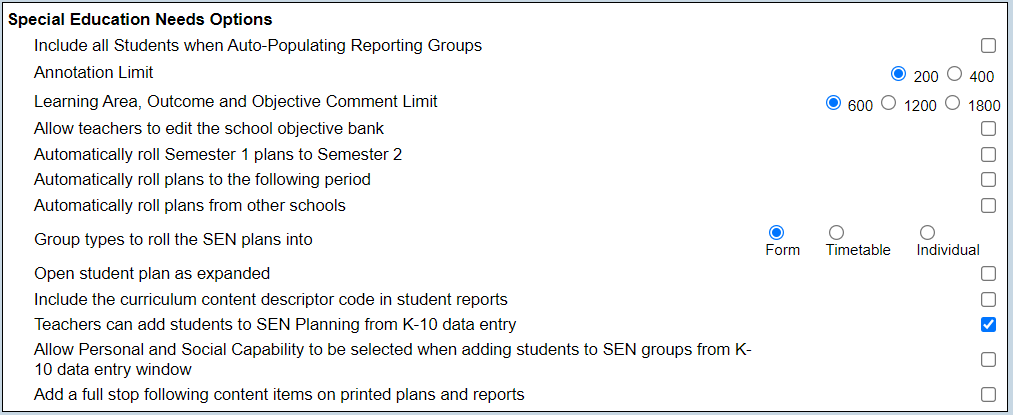
Special Education Needs Options This is used to set the default parameters for SEN data entry. This option is available only for schools using the SEN template. The options are: • Include all Students when Auto-Populating A tick here means that any student can be auto populated in the reporting maintenance section rather than just those that have been tagged in SIS as education support program. • Annotation Limit This can be set as 200 or 400 characters and controls the length of annotations added to photos in the data entry screen. • Learning Area, Outcome and Objective Comment Limit Set the learning area, outcome and objective comment limit to: 600 characters 1200 characters 1800 characters • Allow teachers to edit the school objective bank This allows teachers to edit the school objective bank as well as their own teacher objective bank • Automatically roll Semester 1 plans to Semester 2 Plans in SEN planning will automatically roll over rather than users manually selecting and copying over. • Automatically roll plans to the following period Plans in SEN planning will automatically roll over rather than users manually selecting and copying over e.g. between Semester 2 and Semester 1 the next year. • Automatically roll plans from other schools Plans in SEN planning will automatically roll over from the previous school. • Group types to roll the SEN plans into Select Form, Timetable or Individual. • Open Student plan as expanded In SEN planning all learning areas and objectives will show. • Include the curriculum content descriptor code in student reports When selected, the content descriptor code will be appended to the content descriptor when the SEN report is printed e.g.: "Understand that simple connections can be made between ideas by using a compound sentence with two or more clauses usually linked by a coordinating conjunction (ACELA1467)". • Teachers can add students to SEN Planning from K-10 data entry When selected, teachers will have access to the copy learning area details to SEN icon in the K-10 group data entry window. This icon will allow the teacher to select learning areas from the group that will be reported in SEN. • Allow Personal and Social Capability to be selected when adding students to SEN groupings from K-10 data entry window When selected, teachers will be able to select the personal and social capability content area when selecting group learning areas from the Copy learning area details to SEN function. • Add a full stop following content items on printed and reports When selected, full stops will be included on IEP’s and end of semester SEN reports when the system content descriptors are used.