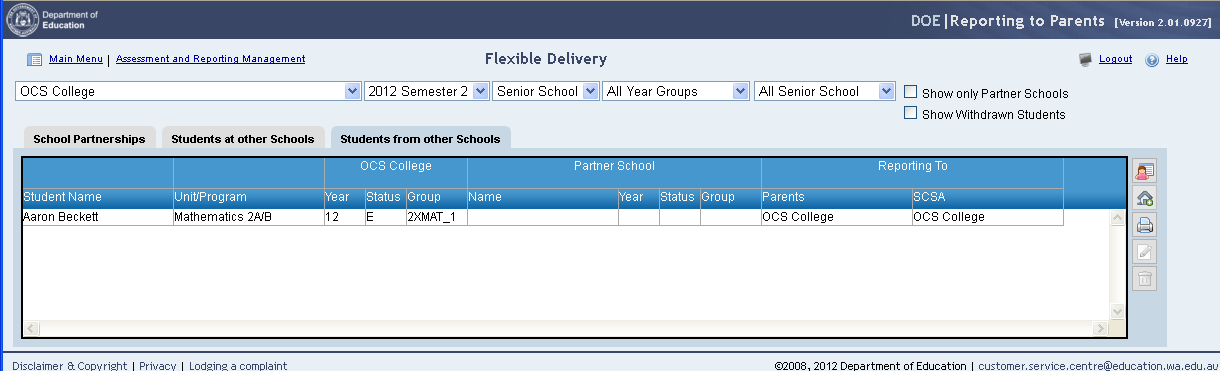
Students from other schools This tab will display the details of any students from other schools that appear in reporting groups at your school. Filters are available to select the required reporting period, school type, year group and program type for the selected school. To view the details for students at other schools: 1. Click on the Students at other Schools tab. 2. The details for any reporting groups at other schools for students on the current roll at your school will be displayed. Filters are provided for: Show only Partner Schools Table records will exclude students that are not associated with a partner school. Partner schools are defined in the School Partnerships tab. Show Withdrawn Students Students that are withdrawn from a course unit are not displayed by default, however these are also included in the SCSA course enrolment file. To review the reporting arrangements for these records click on the Show Withdrawn Students checkbox. The table contains the following details: Student Name Student first name and surname Unit/Program (Senior School) Learning Area (K-10) The unit or program that occurs elsewhere for a student on your Current Roll Year The academic year of the student at your school during the selected reporting period. Status The student enrolment status at your school. Group/Code • Group will appear for K-10 and Senior School types and contains the reporting group for the unit or program at your school. This may be blank if the student does not appear in a reporting group for the unit or program at both schools. • Code will appear for VET types and will contain the qualification code at your school. Partner School Name The name of the school where the student also appears in a reporting group. Partner School Year The academic year for the student at the partner schools. Partner School Status The status of the student at the partner school. Partner School Group/Code • Group will appear for K-10 and Senior School types and contains the reporting group for the unit or program at the partner school. This may be blank if the student does not appear in a reporting group for the unit or program at both schools. • Code will appear for VET types and will contain the qualification code at the partner school. Reporting to Parents The school that will report achievements to Parents. The default school will be the school that has the student on the Current Roll. This may result in Both schools defaulting as the reporting school. For VET type groups, all competencies for a selected qualification will be reported by the selected school. Reporting to SCSA (Senior School) The school that will report achievements to the School Curriculum and Standards Authority. The default school will be the school that has the student on the Current Roll. This may result in Both schools defaulting as the reporting school. For VET type groups, all competencies for a selected qualification will be reported by the selected school. In this example: • Adam Ambrose is on the External Roll at OCS College and the Current Roll at OCS Senior College. The units 2XOED and 3APAE are being undertaken at OCS College; however, the results will be reported to parents and to the School Curriculum and Standards Authority by OCS Senior College.
 tab.
tab.