Table of Contents Back Previous Next Logo

Managing Roles
Managing Roles
The Manage Roles feature is a specific user management tool designed to enable school Principals to grant SAIS access to selected users in their school. This feature effectively empowers the school Principal to manage who, within their school, has access to SAIS.
A user that is granted access using this feature is automatically assigned the School Enquiry role.
To manage roles for SAIS:
On the Main Menu, select Manage Roles.
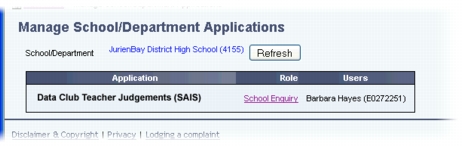
The Manage School/Department Applications screen is displayed.
Although this screen is accessed from the SAIS application, this feature actually enables you to manage the school users of multiple applications used by the school.
Locate the Data Club Teacher Judgements application in the list, and click on the School Enquiry link in the Role column.
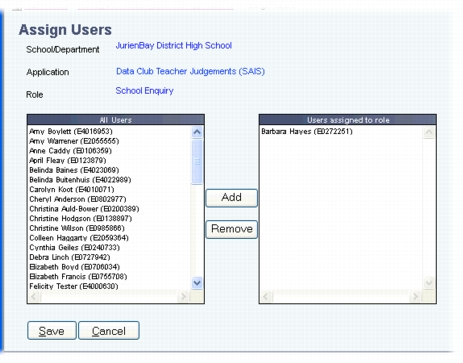
The Assign Users screen is displayed.
This screen is designed to enable you to easily select users from your school and assign them access to the SAIS application.
The All Users list box shows all the users from your school. The Users assigned to role list box shows all the users that have been assigned access to SAIS, with the role School Enquiry.
Select a user in the All Users list box by clicking on the user's name.
Click Add.
The user's name is moved to the Users assigned to role list box. You can now repeat this for other users.
i
Click Save.
The Manage School/Department Applications screen is displayed and the users that you added appear in the User column for Data Club Teacher Judgements. The listed users can now access SAIS.

Table of Contents Back Previous Next
http://www.eddept.wa.edu.au
Tel: (08) 9264 4111
(08) 9264 5005
websupport@det.wa.edu.au