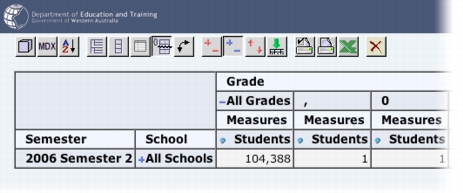
The Analysis feature enables you to select one of a number of predefined queries, and analyse the results of the query using the Mondrian query tools.
The Select Query screen is displayed.
Select one of the predefined achievement queries from the Select a Query drop-down list.The screen is refreshed and the Query Parameters are displayed.
Select the Query Parameters.The Analysis Results screen is displayed.The query results are presented on this screen in a spreadsheet format. The toolbar that is displayed above the results is the Mondrian toolbar.You can now use the Mondrian tools to analyse the query results, and you can export the results to a Microsoft Excel file.
To close this screen and return to the Select Query screen, click the Home button (red X) on the Mondrian toolbar.
|
http://www.eddept.wa.edu.au |
| Tel: (08) 9264 4111 | |
| (08) 9264 5005 | |
| websupport@det.wa.edu.au |